NEWSLETTER / SYSTEMS DRIVEN WEEKLY
The Workday Shutdown
The 15-minute end-of-day routine that plans tomorrow, closes every loop, and lets you go home without anxiety.
In our last article we went over “weekly planning”. The main idea was to adopt a productivity system which allows you to take long-term goals and narrow them down to a weekly action plan.
The result of that weekly planning session? A “Weekly Big 3”, the main items you’ll focus on to move the needle that week.
But knowing what to work on this week doesn’t tell you what to work on tomorrow. That’s where the second most important productivity routine comes in: “The Workday Shutdown Routine”.
I run this process, religiously, every workday at 4:30pm to turn my weekly plan into tomorrow’s action plan.
It takes about 15 minutes. And it’s the reason I go home without anxiety.
Why You Need a Shutdown Routine
The shutdown routine does three things:
- It keeps you working on the most important stuff at the daily level. If you have 8 hours of work, you want those hours spent as efficiently as possible, doubling down on the things that only you can do. The things that give you joy, provide the most value, and move the business forward.
- Nothing falls through the cracks. No email goes unanswered, no deadline gets missed, no balls get dropped. Any given day has the ability to blow up and this routine makes sure one bad day doesn’t wreck your whole week.
- You can be fully present in the rest of your life. When you shut down work well (tie up loose ends, plan tomorrow), you can transition to your second shift: spouse, parent, friend. You go home unanxious because you know the loops are closed and tomorrow is well planned, you will execute on the most important items.
Cal Newport talks about this in Deep Work. If you can’t work late, if you can’t extend the day, then your focus during the day becomes do-or-die. The shutdown routine forces that constraint, and the constraint is what enables focus.
When you’re fully present at home, you’re not bringing work stress back with you. Which means when you come back to work the next morning, you’re not bringing home stress either. It’s a virtuous cycle.
The Routine
I have this scheduled on my calendar every day at 4:30 PM. I drop everything and attend this meeting with myself. In seasons where I haven’t been disciplined about it, I’ve had my assistant schedule it and hold me accountable.
I follow an SOP, just a checklist I go through step by step. It’s hard to memorize and easy to skip steps, so I literally follow the list.
Part 1: Review Today
Step 1: Review today’s meetings. I look back at the day. Are there action items or open loops that need to be closed? If so, I add a quick task to my inbox. Remember, we have a system set up for this. If you don’t, check out last week’s article where we built it.
Step 2: Review today’s Big Three. How far did I get? Did I complete them? If not, they might carry over to tomorrow. I note the progress.
Step 3: Note completed tasks. Anything I checked off or progress I made today, I note it and take a moment to acknowledge it. Small wins matter.
Part 2: Prep Tomorrow
Step 4: Review tomorrow’s calendar. Is there anything happening tomorrow that I need to prep for? A presentation, a client meeting, a deadline? If so, I add action items to my task inbox.
Step 5: Triage the task inbox. Same process as the weekly review, the 4 Ds. For each item: Is it actionable? If not, delete it or add it to a someday/maybe project. If yes, can I do it in under 2 minutes? Do it now. If not, is it mine? Delegate or defer.
When I defer a task, I tag it with an area (personal) or core function (work), assign it to a project if it has one, and add a due date if it’s time-sensitive. Notion automatically routes it to the right list from there. I’ll explain my tasks list in more detail in a future article.
Part 3: Plan Tomorrow’s Big Three
This is the main outcome of the shutdown: choose your “Daily Big 3” for tomorrow.
Your “Daily Big 3” should be driven primarily by your “Weekly Big 3”. What’s the next milestone I need to hit to make progress on this week’s priorities? That’s my starting point.
Then I factor in what’s already on tomorrow’s calendar. If I have 3 sales calls, that might be one of my “Daily Big 3” for the day, not because it’s a project, but because it’s the thing that only I can do and it’s going to eat up much of my time.
Once I have my “Daily Big 3”, I review three lists to schedule the rest:
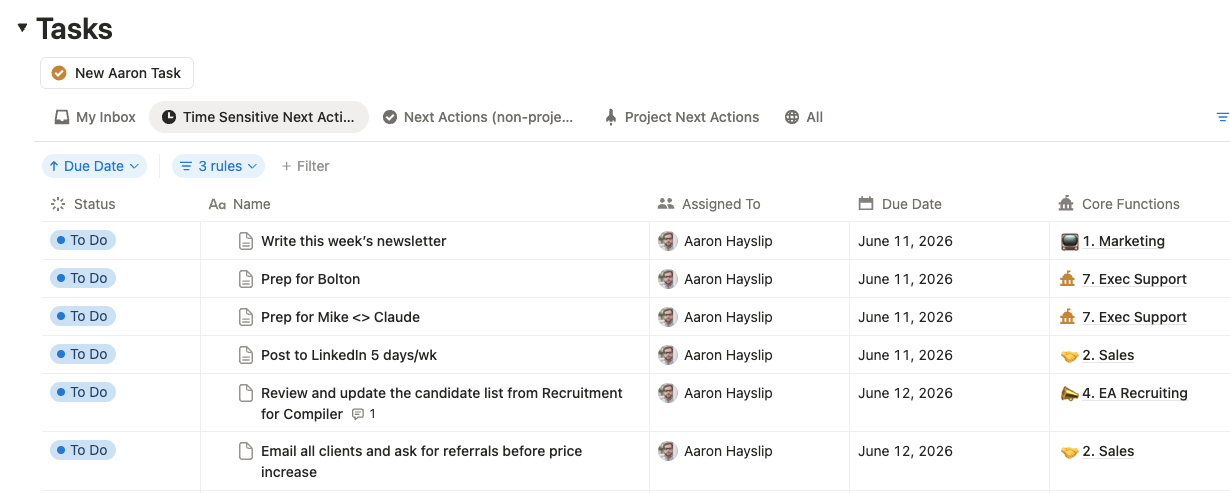
Tasks due tomorrow. I have a filtered view in Notion that shows all tasks with due dates in ascending order. These are urgent and they have to get done. I batch them together and add a calendar block with the tasks listed in the description.
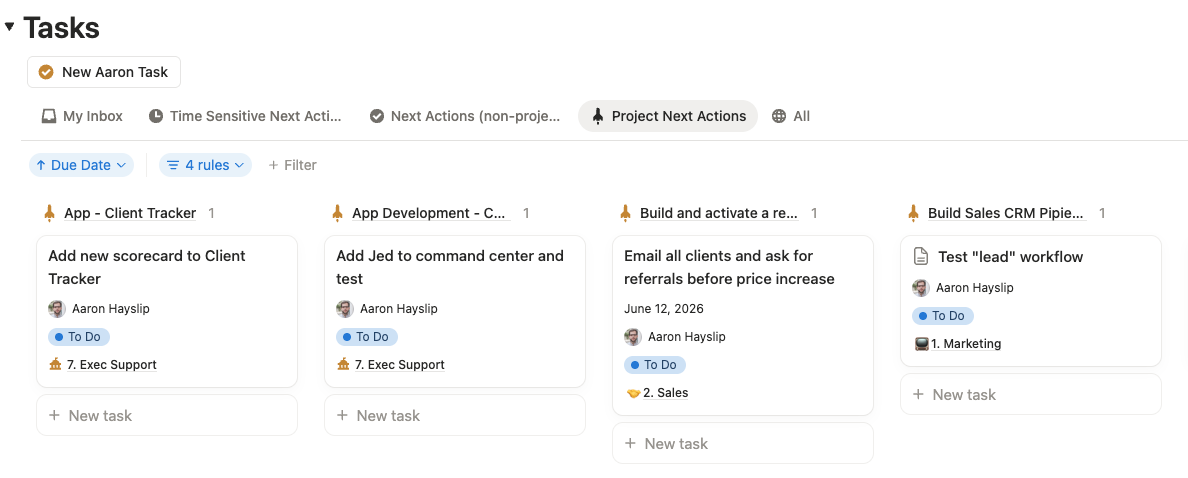
Current project next actions. I usually have 5 to 7 current projects, each with one defined next action. My “Weekly Big 3” usually already accounts for these, but I check to see if any need attention.
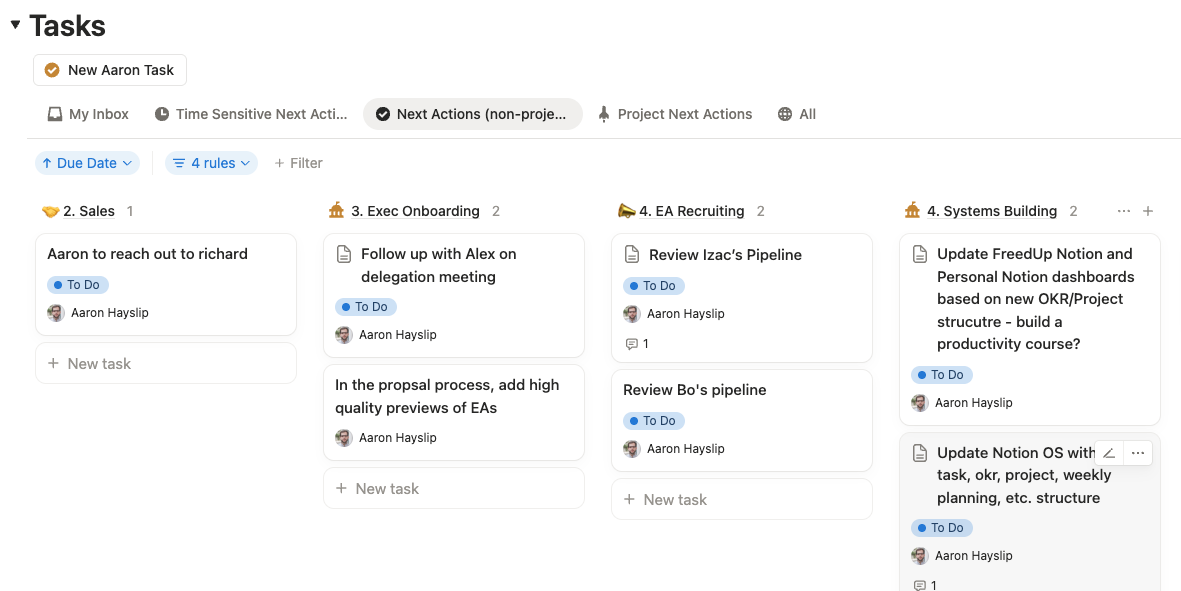
Standalone next actions by core function. My ideal week calendar has a theme per day (Monday is finance, Thursday is sales, etc.) so I look at tomorrow’s theme and pull the matching tasks. If tomorrow is finance day, I find all the finance tasks and batch them into a calendar block.
KEY INSIGHT
If I drop the ball on tasks but hit the nail on the head for important projects that move me closer to my goals, that’s a win. Tasks can always get done. Strategic progress can’t be delegated.
Part 4: Shut Down
Once everything’s triaged and tomorrow is planned, I do a final review of my “Daily Big 3”. Is this still accurate? Is this still what I want tomorrow to look like? If yes, I’m done.
Sometimes I’ll share in Slack what I got done today and what my victory for tomorrow looks like. It’s a small accountability move that keeps the team aligned on what I’m focused on.
Then (and I stole this from Cal Newport) I close all my applications, shut my computer, make sure my phone has no work-related notifications, and I literally say out loud, “Workday Shutdown”.
It’s a psychological cue. The day is done. You don’t know what kind of day you just had. Maybe it was great, maybe you wasted time. There are surely moments you were faithful today, and moments that need to be redeemed tomorrow. But the day is done.
I get in the truck and drive home knowing that loops are closed, tomorrow is planned, and I can be fully present tonight. That feeling is worth the 15 minutes.
The 80/20 Rule
I want to be honest: this happens about 80% of the time. Not every day. Some days I just want to keep working and it doesn’t feel productive to stop. Some days I freak out and feel like I didn’t get enough done.
But 80% consistency is great. And on the days I skip it, I can feel the difference the next morning, scattered, unclear, anxious about what I forgot.
The routine isn’t about perfection. It’s about resetting. Every day is a new chance to be focused, and the shutdown is what makes that reset possible.
Build Your Shutdown
Here’s what to do right now:
- Block 4:30 PM on your calendar every day this week. Label it “Workday Shutdown.” Treat it like a meeting you can’t move.
- Write your checklist. Review today’s meetings, review “Weekly Big 3”, today’s “Daily Big 3”, triage inbox, review tomorrow’s calendar, choose tomorrow’s “Daily Big 3”, review next action lists, say “workday shutdown” out loud. Put it somewhere you can follow it step by step.
- Pick a shutdown phrase. It sounds cheesy, but saying it out loud creates a real psychological boundary between work and the rest of your life. Try it for a week.
The weekly review tells you what to work on this week. The workday shutdown tells you what to work on tomorrow. Together, they’re the operating system that makes everything else in the productivity stack actually work.
Don’t want to build this yourself? My team at FreedUp will set up your productivity system, run your weekly review alongside you, and handle the tasks you shouldn’t be doing in the first place.